SUFRA POS — Smart Restaurant Management Made Simple
Professional Windows POS Software for Restaurants, Cafés & Food Businesses.
- Offline-first
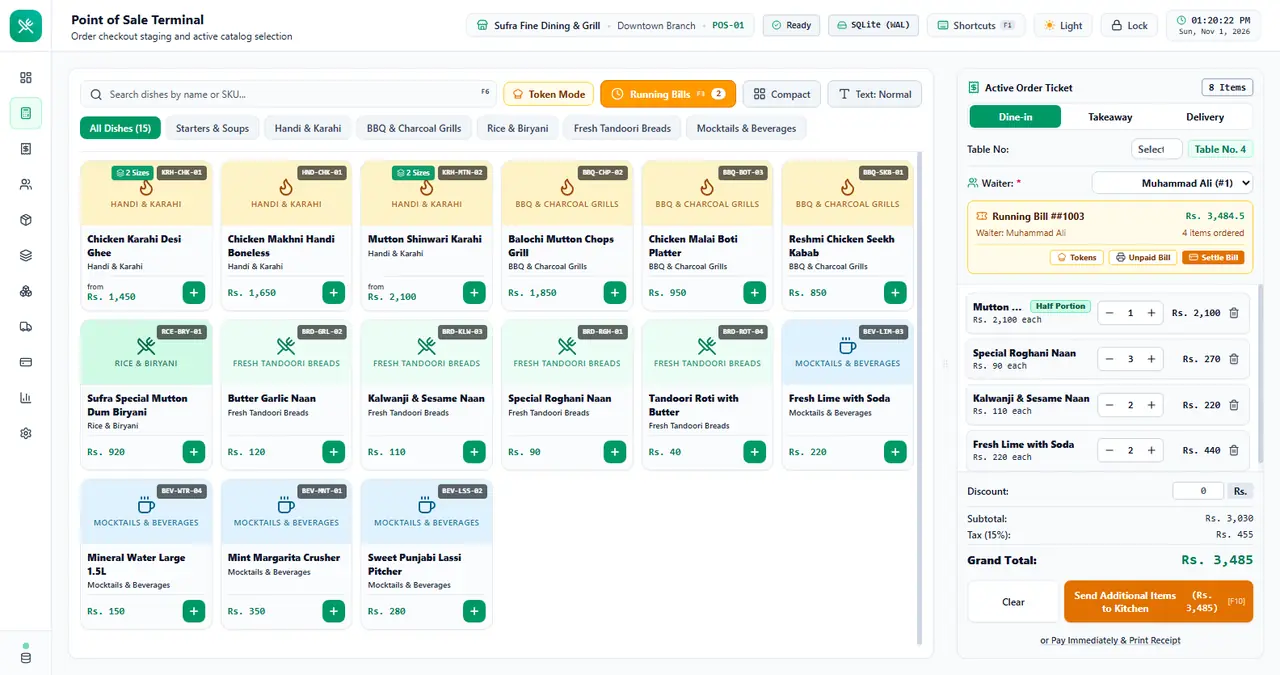
- Fast order & billing
- Dine-in, takeaway & delivery
- Inventory & management
- Reporting & insights
Monitor Your Restaurant. Anywhere. Anytime.
Your Restaurant's Performance, Right in Your Hands.
Real-time live sales, order tracking, and financial reconciliation from your smartphone, tablet, or web browser.
Owner Mobile Portal Showcase
Swipe left or right to explore all 19 original mobile application screens. Tap any screenshot for full-screen zoomable inspection.
Executive Operations Dashboard (Light Theme)
Simple, Transparent Restaurant Pricing
Choose the right plan for your business. Windows POS software for your counter, or the complete suite with real-time mobile monitoring for owners.
SUFRA POS Only
Windows-based restaurant management software.
View Details
- Complete Windows POS.
- Offline-first local database.
- Fast order booking and billing.
- Kitchen tokens and thermal printing.
- Inventory and expense management.
- Sales reports and analytics.
SUFRA POS + Owner Monitoring
Includes complete SUFRA POS software plus the Owner Mobile Monitoring System.
View Details
- Everything in SUFRA POS.
- Live sales and collection monitoring.
- Bills and transaction tracking.
- Staff and cashier monitoring.
- Expenses and sales analytics.
- Remote subscription status.
See SUFRA POS in action
45 real screens from the SUFRA POS desktop application. Drag, swipe or use the arrows to shuffle the deck. Tap any screenshot for full-screen inspection.
Everything your counter, kitchen and office needs
Every module explained in simple terms, with the real business benefit.
Built for the way restaurants really work
SUFRA POS brings order taking, kitchen tokens, billing, payment collection, menu management and reporting into one touch-friendly Windows application.
From setup to daily reports in six steps
A separate workflow for every kind of order
From kitchen token to final bill
Know your stock, spending and sales
Your Restaurant Keeps Working Without Continuous Internet
Core restaurant operations run on a local SQLite database on your Windows PC, so routine order entry does not depend on the internet.
Works offline
- Dine-in, takeaway and delivery order entry
- Menu, kitchen tokens and customer bills
- Local records of sales, inventory and expenses
- Reports and local staff accounts
Needs internet
- First activation of your restaurant
- Subscription renewal and license-status synchronization
Your POS business database stays local; only licensing information is intended for Zee Technologies’ central service. Because data lives on your PC, keep a backup plan — a device failure can cause data loss.
Frequently asked questions
Ready to simplify your restaurant?
Request a SUFRA POS demo or trial from Zee Technologies.
Contact Zee Technologies
Reach us directly. Pick whichever is easiest for you.
WhatsApp / Phone+92 319 3455443→Emailzeetechnologies.pk@gmail.com→Call us+92 319 3455443→Websitezeetechno.com→Getting started
- Contact Zee Technologies and select a trial or subscription plan.
- Install the compatible Windows desktop application.
- Enter restaurant name, address and contact details during setup.
- Activate with the credentials provided by Zee Technologies (online).
- Configure menu, products, staff accounts, payment methods and printer.
- Start taking dine-in, takeaway and delivery orders.